Chrome Extension · Open Source
Threads DraftCraft
Sort your Threads.com drafts by scheduled date, see when every post goes live, and get a clear overview of your content queue. Runs entirely in your browser — no accounts, no servers, no data leaves your machine.
The Story Behind DraftCraft
How a simple need for organization became a tool for the Threads community
Threads.com is a powerful platform for sharing ideas, but managing multiple scheduled drafts can quickly become chaotic.
As creators, we need to know exactly when our content is going live. The default drafts interface often lacks the sorting and overview needed for a smooth content workflow. I realized that many of us were struggling to keep track of our post sequences and timing.
I built Threads DraftCraft to bridge that gap. It's a lightweight, surgical enhancement to the Threads interface that respects your privacy while giving you the tools you need to manage your content like a pro.
What Threads gets wrong about drafts
The drafts interface was designed for saving ideas, not for managing a content schedule. Once you have more than a handful of scheduled posts, the cracks show fast.
Without DraftCraft
- Drafts appear in no particular order - newest, oldest, or seemingly random
- Scheduled publication times are buried or hard to scan at a glance
- No overview of your upcoming week - you open each draft individually
- Easy to accidentally overlap posts or leave gaps in your schedule
With DraftCraft
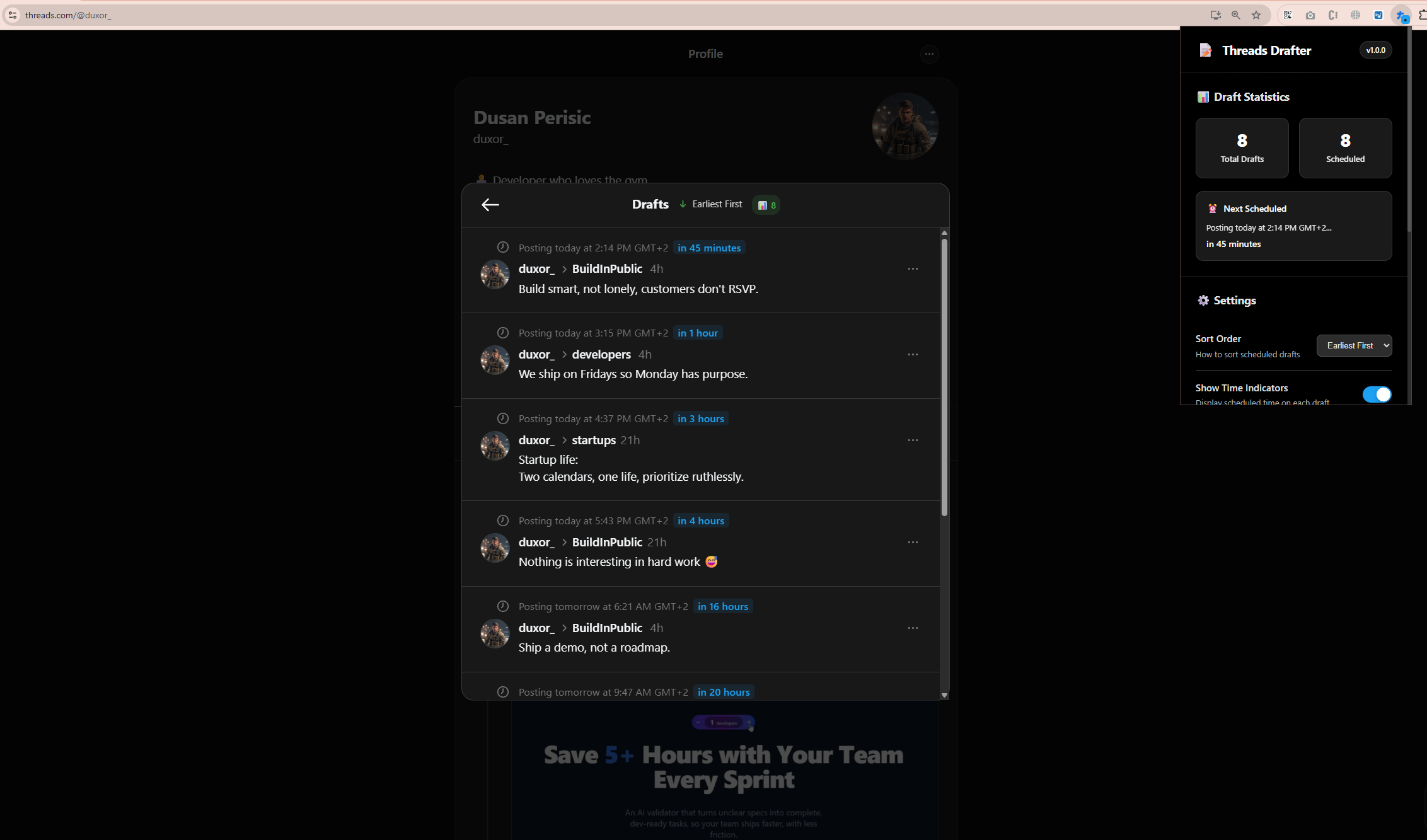
- Drafts sorted chronologically - the next post to go live is always on top
- Scheduled times displayed prominently on every draft card
- At-a-glance statistics on total drafts and upcoming publications
- Clean interface that makes schedule gaps and overlaps obvious
See It In Action
Visualize your Threads.com drafts with chronological sorting and clear time displays.
What it does
DraftCraft is a single content script that reads your existing drafts page and reorganizes it. No API calls, no background processes.
- Chronological sorting
- Drafts are reordered by scheduled publication time. The next post to go live sits at the top — no scrolling, no guessing.
- Visible timestamps
- Scheduled dates and times are pulled out of the card details and displayed prominently, so you can scan your entire queue in seconds.
- Queue statistics
- A summary bar shows your total draft count and how many posts are scheduled for the next 24 hours, this week, and beyond.
- Cleaner layout
- Draft cards are tidied up with better spacing and hierarchy. Information you need is visible; clutter is reduced.
- Zero data collection
- Everything happens inside your browser tab. No server calls, no cookies, no analytics. Close the tab and there is nothing left behind.
Get started
DraftCraft is not on the Chrome Web Store yet. For now, install it manually from source — it takes about a minute.
- 1
Clone the repository
Run
git clone https://github.com/duxor/threads-draftcraft.gitor download the ZIP from GitHub and extract it. - 2
Open the extensions page
Navigate to
chrome://extensionsin Chrome, Edge, Brave, or Arc. Toggle Developer Mode on in the top-right corner. - 3
Load the extension
Click Load unpacked, select the cloned folder, and navigate to Threads.com. Open your drafts — the extension activates automatically.
Future Enhancements
Tagging System
Add custom tags to drafts for better categorization.
Draft Notes
Add private notes to drafts for future reference.
Notifications
Reminders before scheduled publications.
Analytics
Insights into posting patterns and engagement.
Frequently Asked Questions
That's the exact pain point DraftCraft was built to solve. Threads.com buries scheduled times and shows drafts in a seemingly random order. DraftCraft injects chronological sorting and prominent time displays directly into the drafts interface, so you always know what's publishing next.
From the blog
Guides on content scheduling, draft management, and growing your presence on Threads.
Why your Threads drafts feel like chaos - and the one fix that changes everything
You have fifteen scheduled posts and no idea which one goes live next. Here is why the default Threads drafts interface fails content creators and how one small change fixes it.
Content scheduling on Threads: a complete strategy for consistent growth
Posting randomly on Threads is easy. Growing an audience is not. Here is a scheduling framework that turns sporadic posting into a repeatable content engine.
The best times to post on Threads in 2026: what the data actually shows
Everyone has an opinion on when to post. Most of it is recycled Instagram advice. Here is what actually works on Threads based on platform behavior and creator patterns.
How to build a Threads content calendar that actually works
Content calendars sound great in theory and collapse in practice. Here is a lightweight system designed for Threads that survives contact with real life.
Threads vs Twitter vs Bluesky: where should content creators invest their time
Three platforms, three algorithms, three cultures. Here is an honest breakdown of where each one stands and which deserves your content energy in 2026.
Building a Chrome extension from scratch: lessons from Threads DraftCraft
A technical walkthrough of how DraftCraft was built - from content scripts to DOM manipulation - and what I learned shipping a browser extension for a platform I use daily.
Privacy-first browser extensions: why your data should never leave your browser
Most browser extensions ask for permissions they do not need. Here is why local-only architecture matters and how to tell if an extension respects your data.
Open source tools for content creators: the case for community-built software
The best creator tools are not always the ones with the biggest marketing budgets. Here is why open source alternatives deserve a spot in your workflow.